%20(250%20x%20100%20px).png)




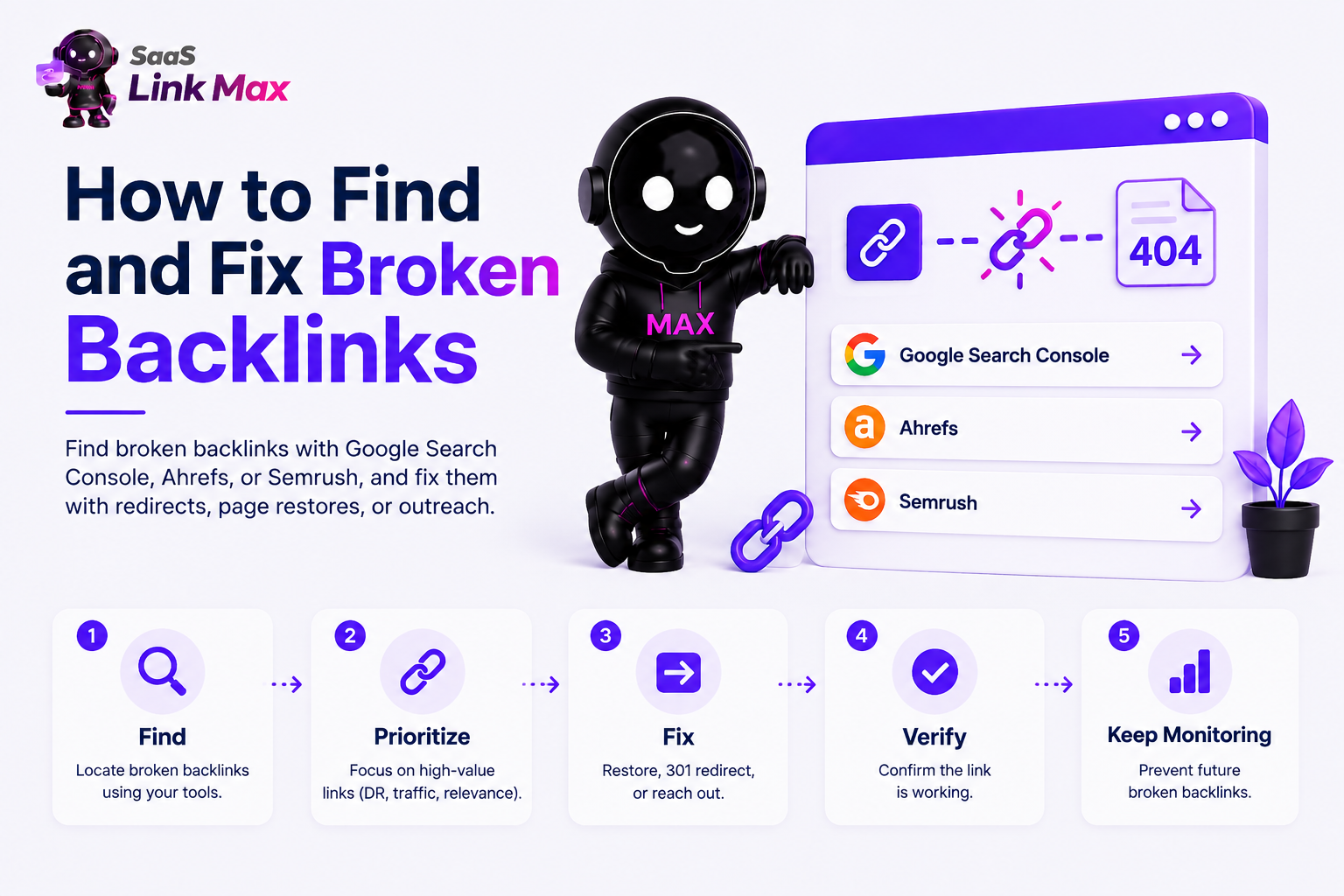
A broken backlink is a link from another website pointing to a page on your site that no longer exists. You find them with tools like Google Search Console, Ahrefs, or Semrush, and fix them by restoring the page, adding a 301 redirect to a relevant live page, or asking the linking site to update the URL.
Below, I’ll explain the full process, including which tab to click in each tool, which redirect type preserves link equity, and how to prioritize your list when you're staring at hundreds of them.
I run a SaaS link-building agency, so this is based on what our teams do day to day.
What Is a Broken Backlink?
A broken backlink is an external link, from someone else's website, pointing to a URL on your site that returns an error, usually a 404 (Not Found). The link still exists on their page, but your page doesn't.
It's easy to confuse this with two other things that sound similar but aren't the same problem:
The distinction matters because how you find and fix them is different. You can edit your own broken internal and external links directly. A broken backlink requires either fixing something on your end (redirect, restore) or asking a third party to fix something on theirs.
Why Broken Backlinks Are Worth Fixing
Every backlink pointing to a dead page is link equity that's just... not landing anywhere. Google won't penalize you for having a handful of these. Broken links are primarily a user experience issue rather than an algorithmic red flag on their own. But there's a real cost that compounds:
- You lose the SEO value of a link you (or someone you worked with) likely spent real time or budget earning
- You lose referral traffic - anyone who clicks that link lands on a 404 and leaves
- It signals poor site maintenance at scale, which is a different problem than any single broken link
If you're a SaaS that’s actively investing in earning backlinks, whether that's manual link building, digital PR for SaaS, or SaaS listicle placements, fixing broken backlinks is the cheapest possible addition to that strategy.
How to Find Broken Backlinks
Here's how to pull the list, using the four most common tools.
Google Search Console (Free)
GSC won't show you a dedicated "broken backlinks" report, but it will tell you which of your pages are 404ing, which is half the picture, and it's free.
- Log into Search Console and select your property.
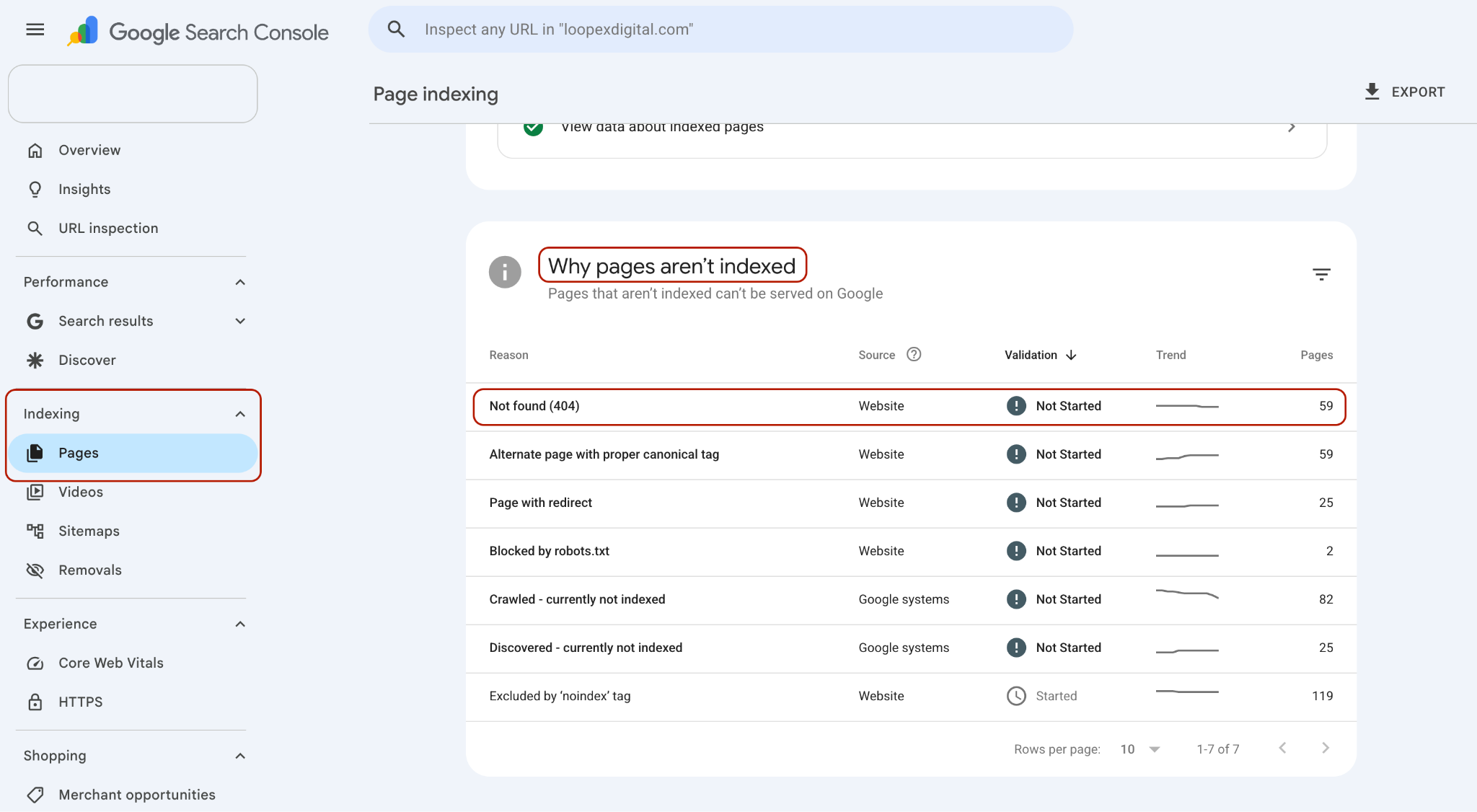
- In the left menu, go to Indexing > Pages.
- Scroll to "Why pages aren't indexed" and click Not found (404).
- Click into any URL and select Inspect URL. This shows referring pages Google found linking to it.
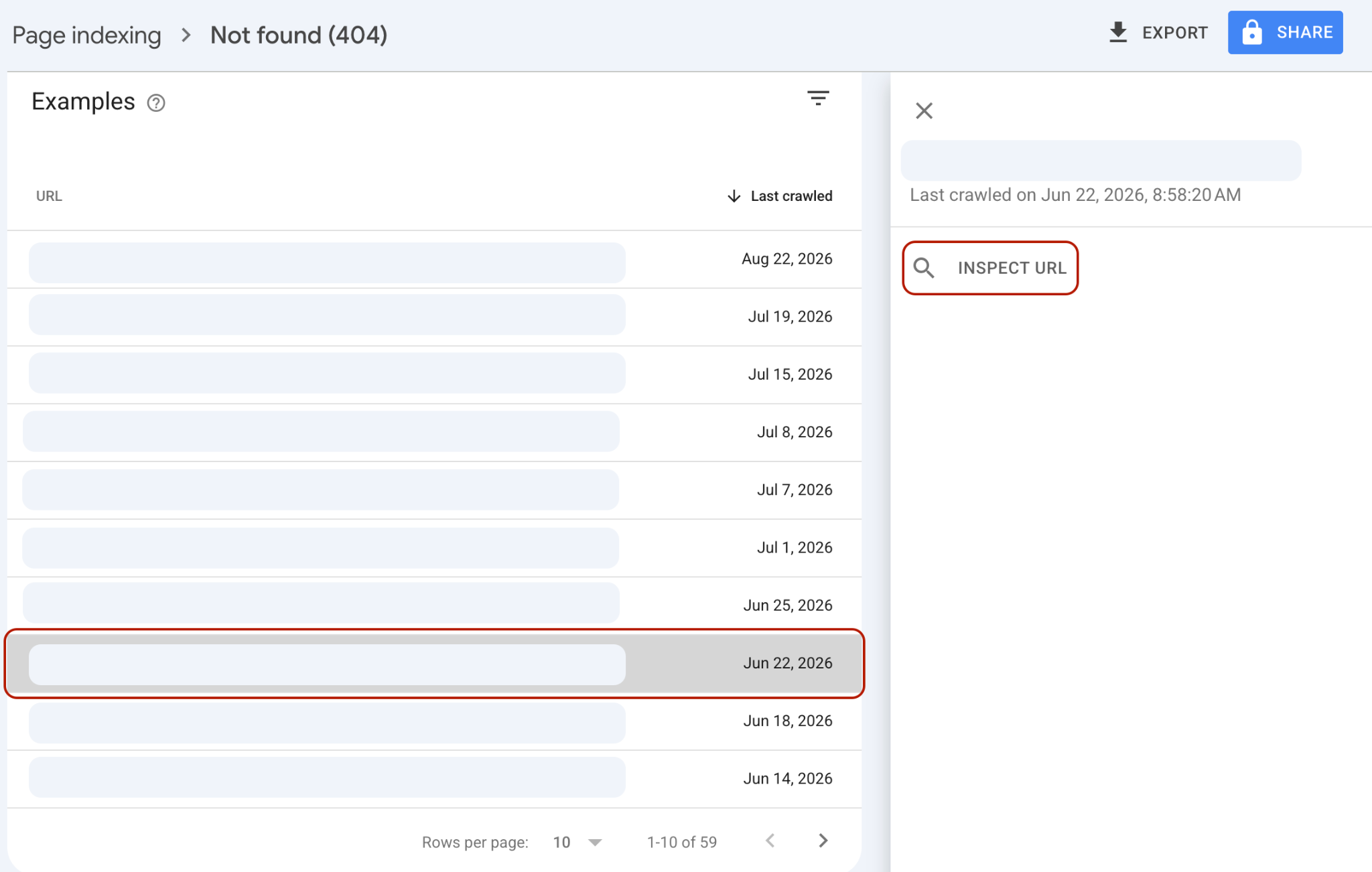
The catch is that GSC only shows you what Google has crawled, and the data refreshes every few days.
It also won't distinguish "this is a broken backlink from another domain" from "this is a broken internal link" - you'll need to check the referring URL yourself to know which one you're looking at. Treat this as your free first pass.
Ahrefs
This is the fastest way to get a prioritized, exportable list.
- Enter your domain in Site Explorer.
- Go to the Backlink Profile > Broken Backlinks.
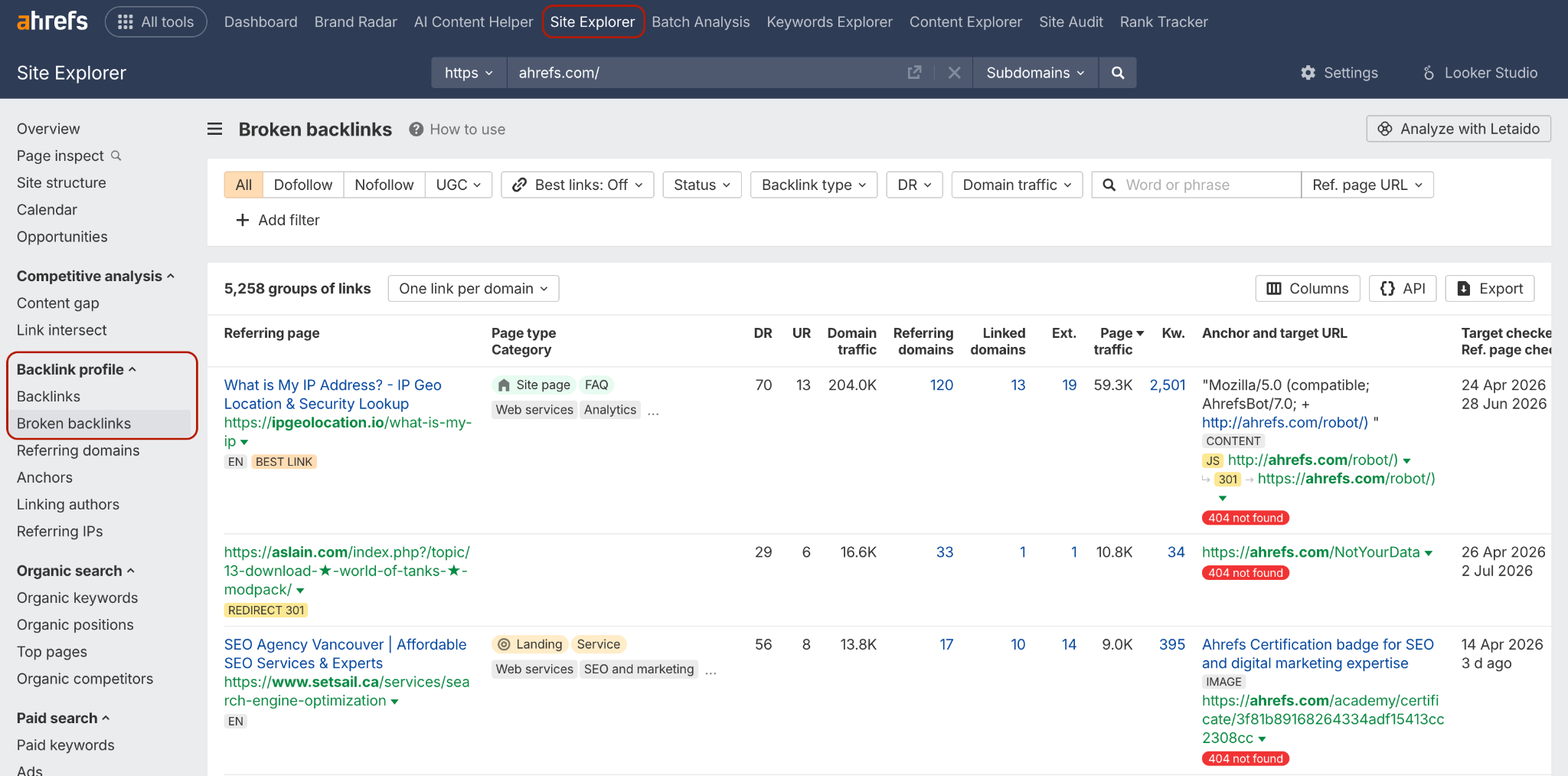
- You'll see every referring URL, plus DR and UR scores so you can see at a glance which broken links are worth fixing first.
- Export the list.
For any redirect you set up, check whether there's a closely related live page first - Ahrefs' "Best links only" view on your own domain is a fast way to find a strong candidate page.

Backlink Monitoring Tools (Monitolink)
If monitoring backlinks to catch changes or issues is a priority for you, you can use a backlink monitoring tool like Monitolink. The steps are way simpler:
- On the dashboard, go to Backlinks > Broken.
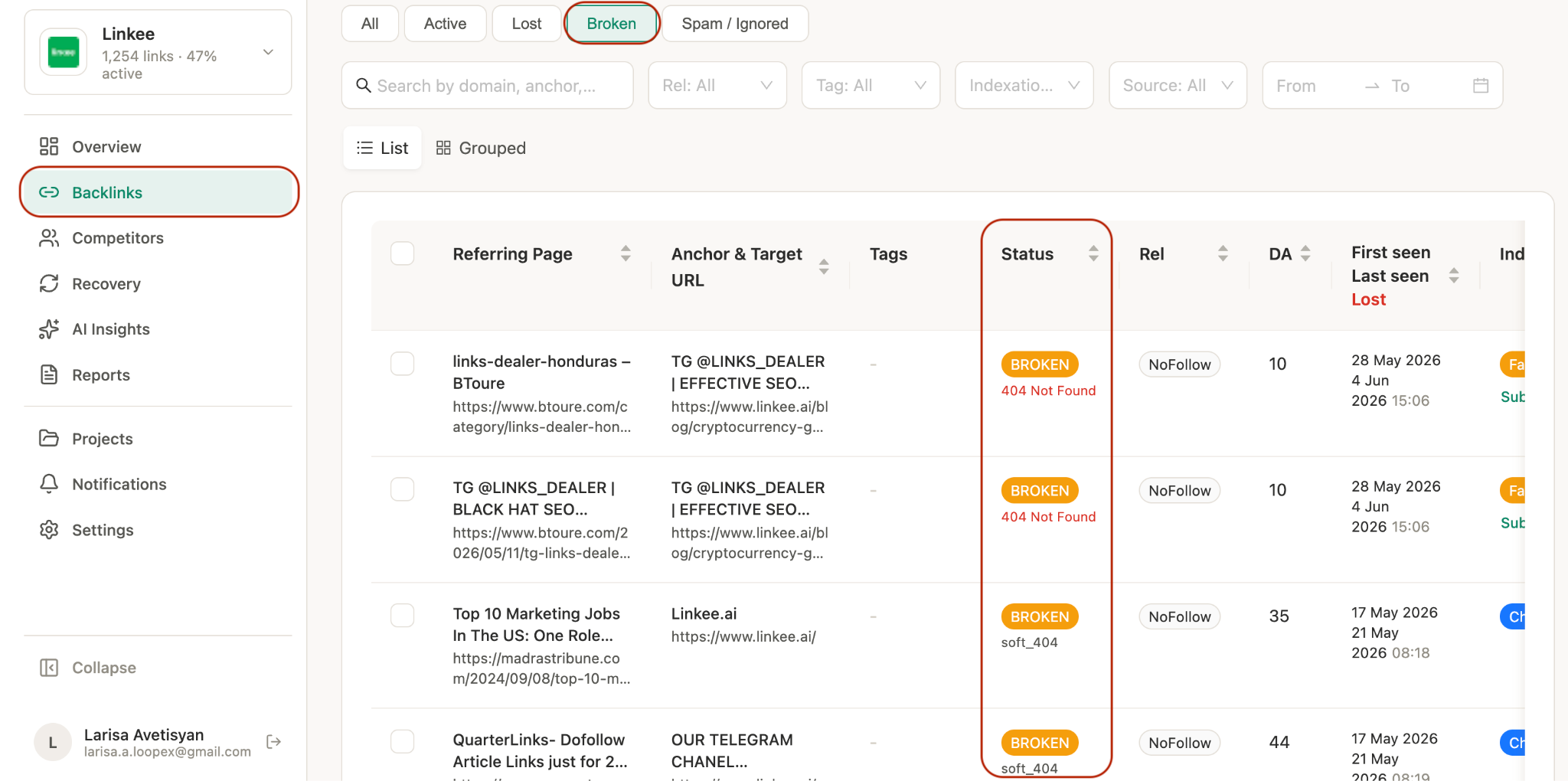
- It automatically filters broken (404 Not Found) backlinks and shows the anchor text, target URL, referring page, redirect status, and the last time it was seen live.
With tools like these, which specialize in monitoring, it’s also easier to conduct outreach when trying to fix the link. I’ll talk more about it in a bit.
Free Option, No Budget Required
If you're not running a paid tool yet, a standalone broken link checker or a WordPress plugin like Broken Link Checker will surface 404s on your site.

It won't give you referring-domain authority data the way Ahrefs or Semrush will, but it's enough to build your first fix list.
How to Fix Broken Backlinks
Once you have your list, you've got three real options. Which one you use depends on whether the page was deleted on purpose, by accident, or just moved.
1. Restore the Page
If a page was deleted by mistake or removed without anyone checking whether it had inbound links, the simplest fix is putting it back. If you don't have a backup, the Wayback Machine often has an archived version you can rebuild from. This instantly recovers whatever equity was pointing at it, with no waiting on redirects to be recrawled.
2. Set Up a 301 Redirect
This is the right call when the page is genuinely gone, but you have something relevant to send visitors and equity to instead.
Two things matter here that a lot of guides skip past:
- Use a 301, not a 302. A 301 tells search engines the move is permanent and passes link equity to the new URL. A 302 signals "temporary," and search engines won't reliably pass equity through it, even though Google has occasionally said 302s can pass value in some cases, don't rely on the exception.
- The Redirect Target Has to Be Relevant. Redirecting a broken backlink to your homepage because it's the path of least resistance is a common shortcut, and it's a mistake. If the redirect target isn't closely related to the original page's topic, Google can treat it as a soft 404, which means you don't recover the value you were trying to save. Find the closest live equivalent page first. If nothing on your site is a good match, restoring the original page or reaching out to the linking site is a better option than a mismatched redirect.
3. Contact the Site Linking to You
This is slower and has a lower success rate, but it's worth doing for high-authority referring domains, especially when you don't have a good redirect target. A short, direct email - here's the broken link, here's the current URL it should point to, is usually all it takes. Site owners fix these faster than you'd expect, since a broken outbound link is a small credibility hit for them too.
When using Monitolink, or similar tools that have built-in outreach capabilities, this step becomes easier. You can simply bring out the contact using the tool and send the outreach email without leaving your dashboard.
How to Prioritize Which Broken Backlinks to Fix First
If you're looking at a spreadsheet with 200 rows, don't start at row one. Prioritize by:
- Referring domain authority - a broken link from a DR 70 site matters more than one from a DR 15 directory
- Number of linking domains pointing to the same broken URL - one fix can recover value from multiple sources at once
- Whether the link ever sent real referral traffic or conversions - check your analytics history for that URL if you have it
- How many keywords the linking page itself ranks for - a page that ranks well is a page Google is actively crawling and passing signal from
Fix the top 20% first. That's usually where 80% of the recoverable value sits.
Final Idea
Fixing broken backlinks is maintenance - it protects the links you've already earned rather than building new ones. If you're looking at your backlink profile and realizing you don't have that much to protect yet, that's a separate, bigger problem. Our SaaS link-building strategies guide is a good next read, or you can reach out to our team if you'd rather have an expert team handle both the earning and maintenance sides.
Frequently Asked Questions
What's the difference between a broken backlink and a broken internal link?
A broken internal link is on your own site pointing to another page on your own site. A broken backlink is on someone else's site, pointing to a page on yours. You can fix internal links directly; broken backlinks usually require a redirect or outreach to the other site.
Does a broken backlink hurt SEO?
A small number won't tank your rankings, but at scale, or on high-authority links, it means real link equity and referral traffic going nowhere.
Can I fix broken backlinks for free?
Yes. Google Search Console will surface your 404 pages at no cost, and free broken link checker tools or WordPress plugins can catch the rest. You'll just get less prioritization data (authority scores, referring domain counts) than a paid tool like Ahrefs or Semrush provides.
How long does it take for the fix to reflect in search results?
It depends on how quickly search engines recrawl the affected URLs. This can range from days to a few weeks. If you're tracking recovery in a tool like Search Console, use the "Validate Fix" option after resolving 404s to prompt a recheck rather than waiting for the next scheduled crawl.
What if the site linking to me won't update the broken link?
Set up a 301 redirect from your end instead. You don't need their cooperation to recover the value - a redirect to a relevant live page works regardless of whether they ever fix the link on their side.