%20(250%20x%20100%20px).png)




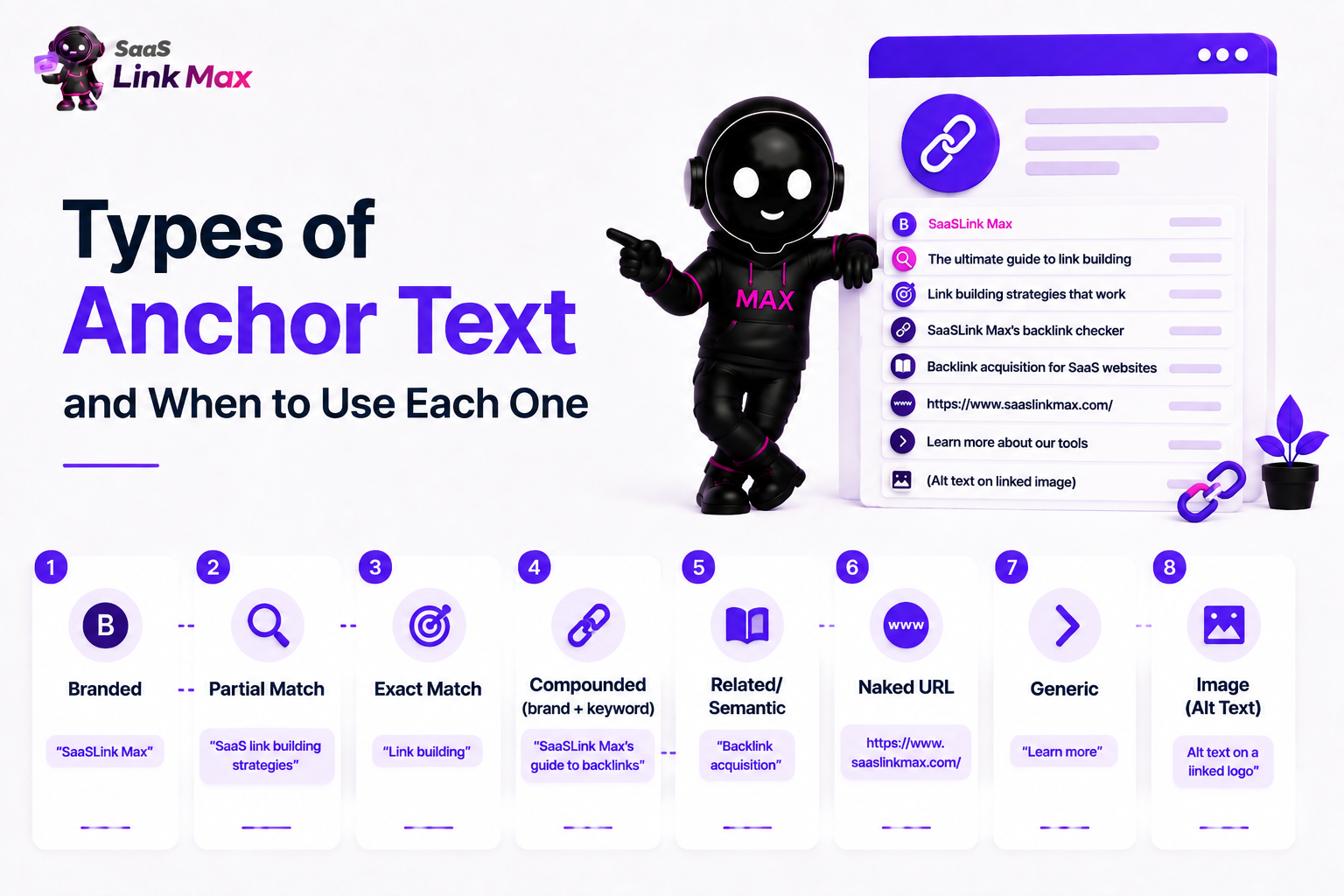
Anchor text is the colored text, usually blue and underlined, that you click to open a link. There are 8 main types we see daily: branded, partial match, exact match, compounded (branded plus keyword), related/semantic, naked URL, generic, and image (same as alt text).
I'll go into each one in more detail below, show what it looks like, and when to use them. It’s important to get these right from the get-go because search engines and LLMs see anchor text as a relevance signal (same for readers who assess whether to click or not).
Quick Summary Table of Anchor Text Types
This is good, but you’ll need a bit more detail on each to use them right.
The 8 Anchor Text Types Explained by A Link Building Expert
1. Branded
This is the simplest one. It's just your company name, like “SaaSLink Max,” and it has a link leading to your company page. That's what people expect as well. When someone clicks on it, they expect to land on your homepage.
It’s also the safest type of anchor, and it is naturally the biggest chunk, usually 40 to 50% of everything. This makes sense too because the bigger you get, the more people start calling your name instead of describing what you do, so they link to your name naturally.
2. Partial Match
This one's the default one you will use constantly. This is when you wrap your keyword in a normal sentence; so instead of saying “link building,” you say something like "our SaaS link building strategies guide.” It feels more human, more natural, and that's the point of this type: it says what the page is in a more contextual way.
3. Exact Match
An exact match anchor is when your text matches the keyword that you are trying to rank for word-for-word. If that keyword is “apples,” the exact match anchor is “apples.”
In theory, it sounds good, and you might think that it helps Google to identify relevance more easily, but that's exactly the opposite because if you overdo it, Google will find it suspicious.
I've seen it in a lot of clients, so as a rule of thumb, use this really rarely and keep it below 10% of your total link volume. Use it only with a high-authority page.
4. Compounded
A compounded anchor text is a brand name plus a little description. For example, “SaaSLink Max's guest post for SaaS service” as a component anchor.
If you think logically, this is a pretty useful one because it has your brand name (so the reader remembers your brand) and a hint about what the page covers (so the reader knows the context). It also implies you're linking to something specific, like a checklist, a tool, or a resource, so use it in those cases.
5. Related/Semantic
Related and semantic anchor texts are used when you can't fit the exact keyword in the sentence naturally. And you shouldn't try to fit it because forced anchors are devalued by Google. Instead, use something related, a simple synonym of your keyword.
Let's say, instead of “contextual backlinks,” maybe you write “backlinks that pass real relevance.” It has the same meaning in different words. Search engines are smart enough to connect the dots and understand it.
So, you can use those in your blog, guest posts, and in places where content is the king.
6. Naked URL
A naked URL is just the URL used as an anchor without any additional words like https://www.website.com. As you can guess, this doesn't have any keyword weight at all, but you will need this on your profile here and there, used in citations, footnotes, and reference lists where it's expected to have a URL instead of a keyword.
7. Generic
Generic anchor texts don't tell you where exactly the link is leading you - “click here,” “read more,” “this article,” “the guide.” Similar to the one before, this barely has any SEO value for you, but again shouldn't be avoided completely. If you want to look natural, a few of those sprinkled around are totally fine. It's what journalists are usually using when referring to your reports, so it's fine to have them, but don't lean on them as a strategy
8. Image (Alt Text)
You might have images, logos, and graphs that are clickable. And when that's the case, the alt text of the image acts as the anchor text. It's usually a small text that describes what's happening in the image, what logo it is, and what the graph is. Search engines read it and rank the media and that page for related keywords.
So, if you don't do it already, this is a lost opportunity, and you should try to optimize your alt text with short, clear, and relevant descriptions.
How to Choose the Right Anchor Text
To this point, I've given you a couple of pointers on when and how to use those anchor texts, but let's have clear criteria in front of us when trying to choose the right type for the right situation.
For that, you need to answer four questions.
Q1: Is it an internal or external link?
If it's an internal link, meaning a link on your side leading to your site, you can be fully creative, descriptive, and use keywords as much as you want while trying to keep the organic feel.
But if it's an external backlink, you really need to try to look natural and diversify anchor texts. All your external links can’t be branded or exact match. That’s suspicious.
Q2: Does the keyword naturally fit the sentence?
Just read the sentence out loud and think if it really sounds natural to a human ear. If it feels like somebody just forced a keyword in there, the reader will notice it as well and search engines will too. So, use the type of anchor that would feel organic; partial match type is a good fit here.
Q3: Have you used this exact anchor elsewhere on the same page?
If you use the same anchor text over and over for the same destination page, it's not organic, especially for internal links. You should strive for variation - mix up a little from here and there.
Q4: Is it a competitive keyword?
Basically, the weaker the linking page, the riskier the exact match anchor becomes, especially for comparative keywords. To play it safe, do branded or partial match instead.
Rules for Internal vs External Anchor Text
For internal links, the rules are pretty clear - you have full control, so you can go keyword-rich and descriptive as much as you want. There are no penalty risks involved. Just try not to use the same anchor text to point to different internal pages because it creates competing signals of which page should rank for that keyword. Be as clear as possible - that's helpful for both your readers and the search engine crawlers.
For external links (backlinks), you rarely have control of the anchor text yourself, but when you do have the chance to influence it (with a guest post, listicle link building or a niche edit), do mainly branded or partial match, and prioritize diversity. That's your best way not to get penalized.
How Much of Each Anchor Text Type Should You Use?
These numbers are just suggestions based on our Saas Link Building agency's experience in the link-building sphere, specifically in SaaS link building. You’ll see similar numbers in industry benchmarks.
But I'm going to give you a cliché note as well - your site’s real target anchor type ratio depends on your niche, domain age, and how competitive the target keywords are. So, the best way is to decide with your expert link builder team.
For example, newer websites usually have a lower percentage of branded anchors because fewer people know about their brand name. That percentage will of course grow over time.
We’ve seen this with a client in the healthcare compliance software niche, and when we just started working with them, branded anchors were a small percentage of the total links. That made sense; the brand wasn't really known yet in the space. Our placements came mainly through digital PR (custom for SaaS) and guest content; so, branded and compound anchors grew and became the majority of the profile. That's a healthy and natural way of growing your link profile and using anchors correctly.
As you see, the main point is to think logically about where you are now, what would naturally happen next, and try to accommodate it with your anchor text strategy. That’s a part of what is called white hat link building.
5 Things Not to Do With Your Anchor Texts
Now you know most of the things to succeed in your anchor text strategy, but let me just quickly wrap up some mistakes I see people make a lot.
- Never overly depend on exact match anchors. As I mentioned before, search engines catch this early and can penalize. Try to diversify your profile.
- Don't use generic anchor text for internal linking. You're losing an opportunity to have descriptive keywords instead of them.
- Never repeat identical anchor texts leading to the same page in a short period of time. Since real editorial texts are diverse and messy, this looks manufactured.
- Don’t leave the alt text empty. Again, it’s a lost opportunity.
- Always make sure the anchor text describes where the link is leading to.
If you’re stepping up your anchor text game now, start by going over these mistakes and clearing them up. We use this as a part of our initial audit as well when working with clients. So, if you want a professional team to go over, catch, and analyze your backlink profile, and come up with sustainable solutions, just get in touch to get a free proposal.
Frequently Asked Questions
What's the difference between <a> and <link>?
The <a> tag stands for anchor, and it's for people who are visiting your site. It creates the colored and underlined phrase you click on, and the code looks like this:
<a href="https://brandname.com">Brand Name</a>
In the middle, you write the words that you want to be your anchor for people to see.
The <link> tag is for computers or the browser, so it works behind the scenes and loads the hidden files like the design rules. An example of it looks like this:
<link rel="stylesheet" href="style.css">
It has nothing to do with anchor text!
How Do LLMs Use Anchor Text And Is It Different from How Google Does It?
LLMs process your anchor text strictly as semantic text to understand relationships and facts. So they use the linking words to understand what the target page topic is about. They also do pattern matching: during training, LLMs see anchor text next to URLs or text blocks, so they learn that the label describes the linked concept.
LLMs also use anchors as internal knowledge when generating an answer. They use anchor text as training data to connect the entities like your website to a specific brand type. For example, they start to associate your brand name with “email software.”
Compared to Google, LLMs just don’t pass any rank value (like a vote of endorsement) to make your page get cited more or rank.